

Evaluate models.
Find mislabeled images.
Supervisely evaluates detection and segmentation models with a report of mAP, precision, recall and the images behind each error. Dataset statistics and AI Search show where the data itself needs fixing.


Every model you train gets an evaluation report.
The Model Evaluation Benchmark runs on the validation set at the end of each training experiment, unless you turn it off, and the report opens from the Experiments table. Its charts of outcomes, precision, recall and confused classes are clickable and open the images behind the numbers.
Object detection
mAP over IoU thresholds from 0.50 to 0.95, computed with pycocotools, plus AP50, AP75, precision, recall, F1-score, average IoU, classification accuracy and a calibration score.
Instance segmentation
The same metrics and charts as for detection, with IoU measured between masks instead of boxes.
Semantic segmentation
Pixel accuracy, IoU and boundary IoU, with the error split into boundary, extent and segment errors, so you see which kind costs the most.
Also in the report: precision-recall curves, per-class precision and recall, the confusion matrix, frequently confused classes, IoU distribution, a reliability diagram, the F1-optimal confidence threshold, and an optional speed test at batch sizes 1, 8 and 16 in PyTorch, ONNX Runtime or TensorRT. How the metrics are calculated
Compare models side by side
Select two or more experiments and choose Compare Model Evaluation to see the metrics, curves and predictions of each model on the same validation data.
Experiments in the docsEvaluate a deployed model
Deploy a model with a serving app, then run the Evaluator for Model Benchmark app on any project with ground truth labels to get the same report.
Evaluator for Model BenchmarkAdd your own metrics
Base classes in the SDK let you write your own evaluator and report with the metrics of your use case, and show it on the Experiments page.
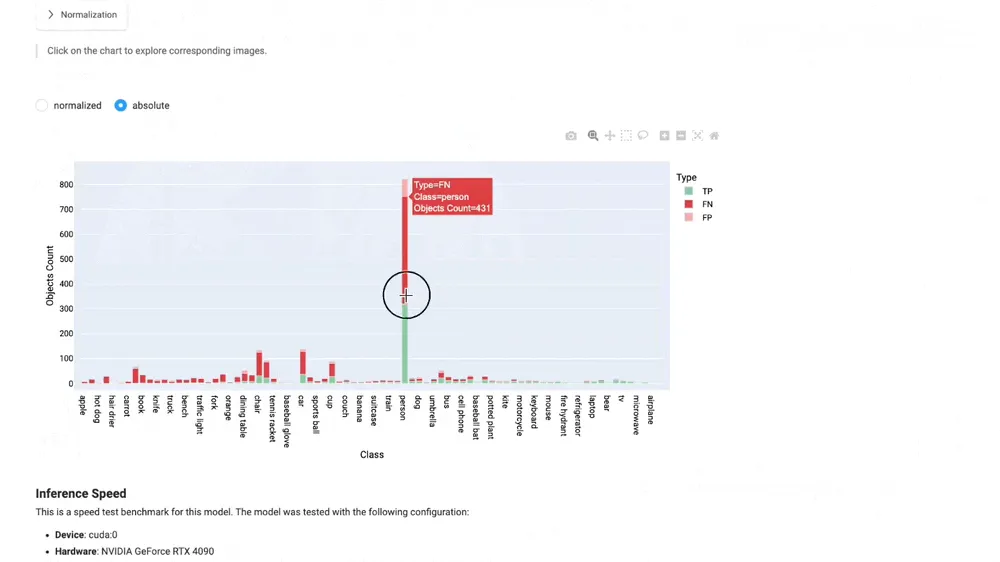
Custom benchmark guideClick any error to see the images behind it.
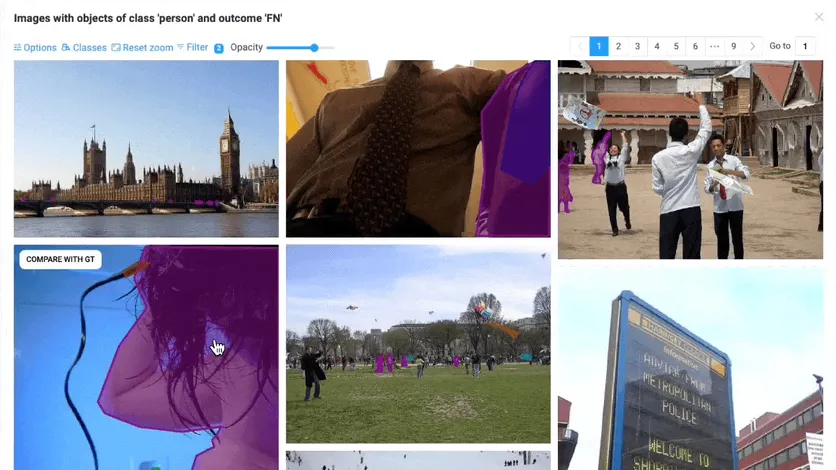
A bar of missed objects, a cell of the confusion matrix or a row of the per-image table opens the exact images, with ground truth, predictions and their difference side by side.
-
Outcome counts by class show what the model finds, misses and invents. The confusion matrix shows which classes it mixes up, such as birds predicted as dogs.
-
Click a bar or a cell to see the images behind it. Compare ground truth with predictions, filter by confidence, or sort the per-image table by false negatives to find the worst cases.
-
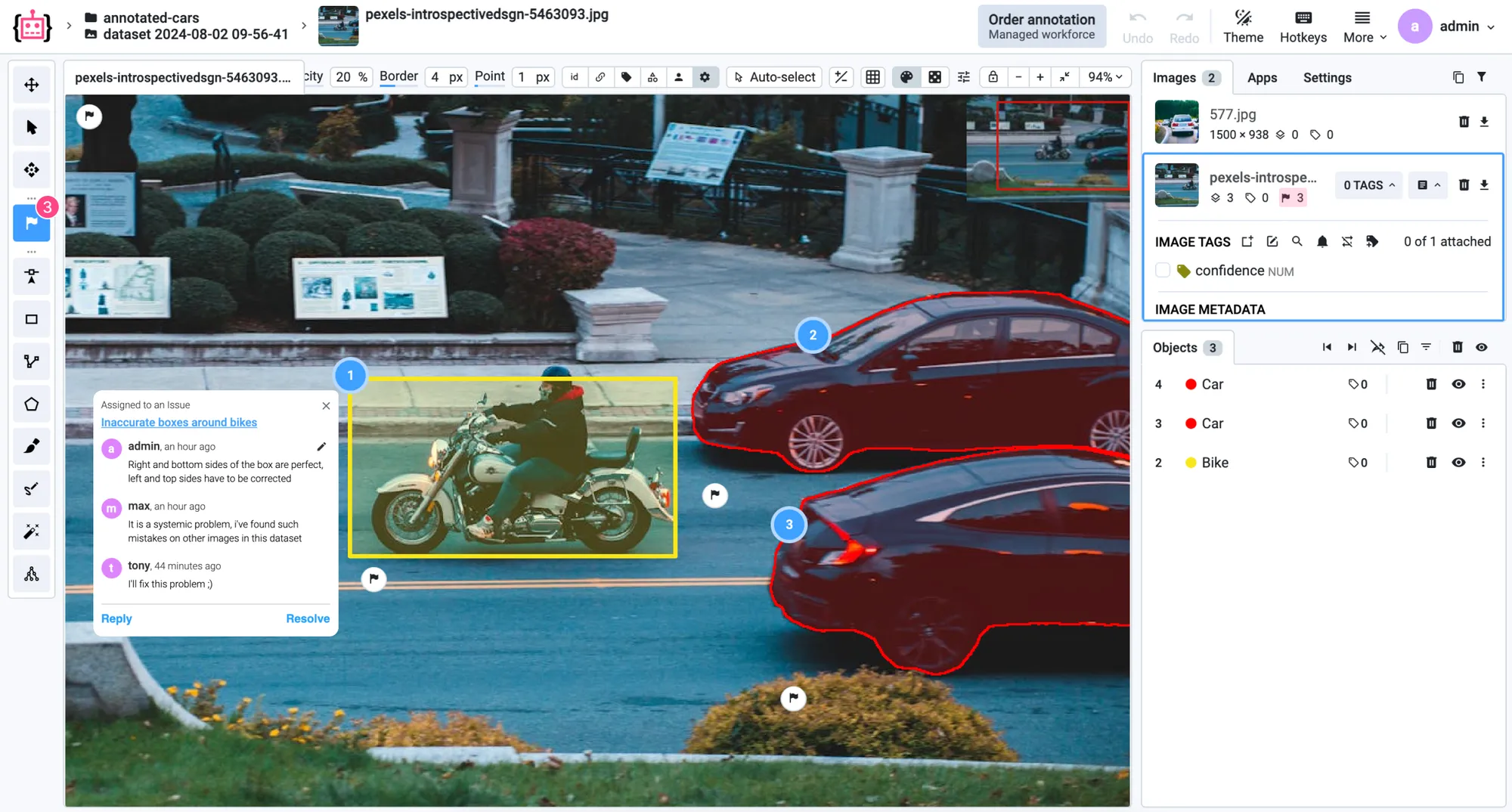
Some errors turn out to be wrong or missing labels. Correct them in the labeling toolbox, or create an issue for your labeling team and track it until it is resolved.
Find the labels behind the errors.
Some errors in the report are wrong or missing labels. Two tools in every image project lead you to them.
Dataset statistics
The QA & Stats tab charts class balance, class co-occurrence, objects per image, class sizes and where objects sit. Unusual pairs, counts or sizes often point to wrong labels, and a click opens the images behind a number.
AI Search
Find more images like a mislabeled one by example, search by a text prompt, or pick a diverse sample to label first. AI Search uses CLIP embeddings that never leave your environment and is available on Pro and in Enterprise.
Turn what you find into better training data.
Evaluation, statistics and search all end in the same place: a set of images to act on. Fix them, label more like them and train again, and the next report shows what changed.
-
Collect
Save what you found as a collection: a selection of images across datasets that filters, labeling queues and training splits can use.
-
Relabel
Send the collection to a labeling job or a queue with review, so fixes are checked before they reach the training set.
-
Fill the gaps
Search for more images of the classes and conditions the model misses, sample diverse new data to label first, or generate synthetic images of rare cases.
-
Retrain and compare
Finetune the model on the improved data from the Experiments table, then compare it with the previous model on the same validation data.
Repeated on new data, this is active learning: the model's errors and diverse sampling decide what to label next, instead of a random pick.
Here’s why teams trust us.
“A very high product quality.”
BMW Group uses Supervisely to annotate manufacturing images from production lines in their world-wide plants for enhancing quality inspections using deep learning. Supervisely is integrated into the BMW Group AI Platform in order to empower computer vision based AI use cases.
 BMW Group · Manufacturing quality inspection
“Immensely grateful for their pivotal role in our work”
Working with Supervisely has significantly enhanced our capability to develop AI models for lung CT scans. What sets Supervisely apart is its exceptional support team who are really responsive and adapt to our unique needs with a range of apps and helper files.

“Helps us to do data scientist work better and faster”
We use Supervisely since 2019. The key advantage of this tool is that Supervisely provides a complete data treatment pipeline. An important advantage is that a Supervisely instance can be deployed autonomously on a Client infrastructure, and distributed on different servers.

“A valuable part of our computer vision operations”
Supervisely is a valuable part of our computer vision operations, enabling our teams to efficiently work with camera and LiDAR data across sensor fusion projects. We use Supervisely for its extensive feature set and its ability to adapt to our changing requirements.

“Extremely satisfied with Supervisely and would highly recommend it”
The review tools have been invaluable in ensuring the quality and accuracy. The Python SDK has also been incredibly helpful in automating and streamlining our workflow. The support team on Slack has been extremely helpful and responsive.

“Supervisely excels at that and much more”
We’ve been exceedingly impressed with the customer support, addition of new features, and the flexibility of the publicly available SDK/API. The Supervisely team has also been fast to respond to support questions, and has shown a lot of openness when given feedback on potential improvements.

Your team next?
Talk to a computer vision engineer about your data, your models and your infrastructure.
Book a demoFrequently asked questions.
How do I evaluate an object detection model in Supervisely?
Train it in Supervisely: by default, the Model Evaluation Benchmark runs on the validation set when training ends, and the report opens from the Experiments table. For any other model, deploy it with a serving app and run the Evaluator for Model Benchmark app on a project with ground truth labels.
Which metrics does the evaluation report include?
For object detection and instance segmentation: mAP over IoU thresholds from 0.50 to 0.95, AP50, AP75, precision, recall, F1-score, average IoU, classification accuracy and calibration score, with precision-recall curves, a confusion matrix and the F1-optimal confidence threshold. For semantic segmentation: pixel accuracy, precision, recall, F1-score, IoU, boundary IoU and error over union split into boundary, extent and segment errors. See how each metric is calculated.
Can I compare several models on the same dataset?
Yes. Select two or more experiments in the Experiments table and choose Compare Model Evaluation. The comparison report shows the metrics, curves and predictions of each model side by side. The models need to be evaluated on the same ground truth project.
How do I find mislabeled images in my dataset?
Start from the errors of a model: a confusion matrix cell or a bar of false positives in the evaluation report opens the images behind it, and some of them turn out to be wrong or missing labels. In the QA & Stats tab, look for unusual class pairs, object counts or sizes and click through to the images. AI Search Similar then finds more images like a mislabeled one, so you can fix them together in a labeling job.
What is AI Search and which plans include it?
AI Search finds images in a project by a text prompt, by example images or as a diverse sample, using CLIP embeddings stored in a vector database. It is available on the Pro plan and in Supervisely Enterprise, and no data or embeddings leave your environment.
Can I add my own evaluation metrics?
Yes. The SDK has base classes for a custom benchmark: an evaluator, an evaluation result and a visualizer that renders the report. Run it from a script, release it as a private app, or call it from your own training app so every experiment gets your metrics.