

Your annotation team,
in one labeling workflow.
User collaboration in Supervisely brings annotators, reviewers and managers into one team with clear roles. Managers assign data through labeling jobs and labeling queues and follow progress, and everyone discusses problems in issues right inside the labeling tool.
A data labeling workflow in four steps.
Every project takes the same path, from the first invitation to the last accepted label.
- 01
Set up the team
Create a team, split its projects into workspaces and invite people with the role each of them needs.
Teams and roles - 02
Assign the work
Give each annotator a labeling job, or put the data into a labeling queue that hands out one item at a time.
Labeling jobs and queues - 03
Label and discuss
Annotators label in the browser and open an issue on anything that needs a second opinion.
Issues - 04
Review and measure
Reviewers accept or reject every item, and the activity log shows who did what and for how long.
Quality assurance
Teams and roles decide who sees what.
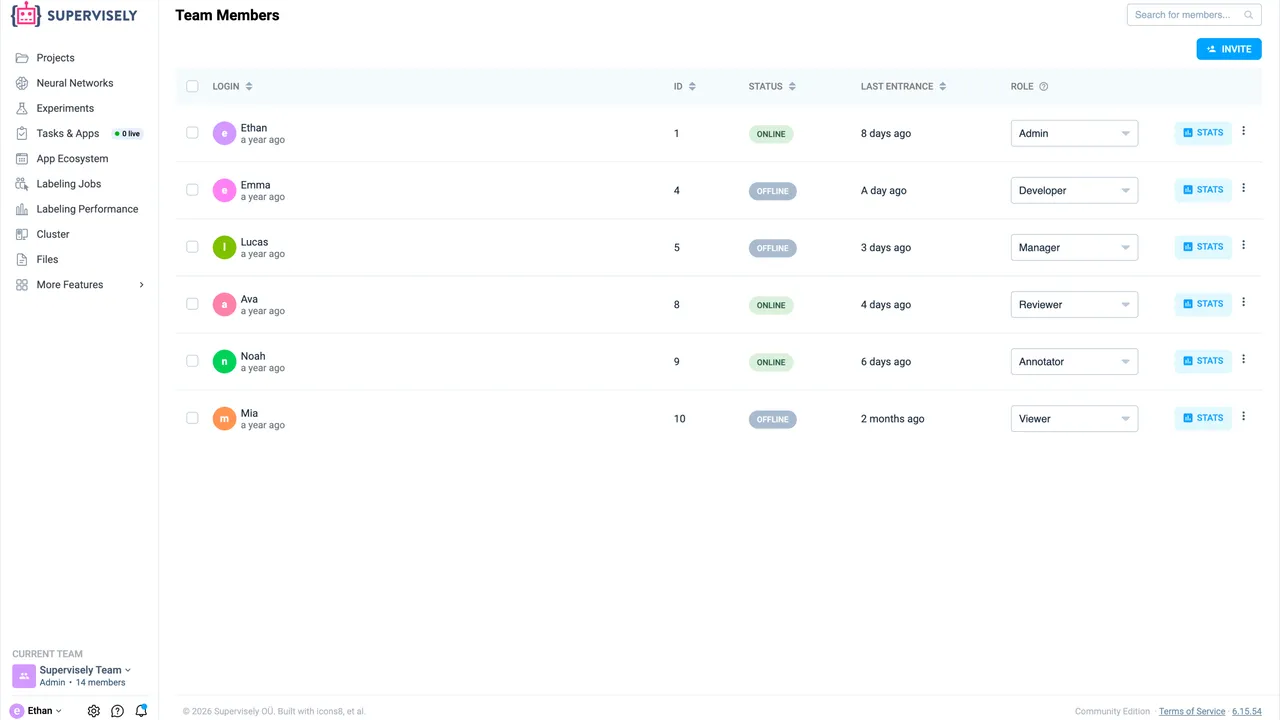
A team is a group of people who share projects, models and files. Each member has a role in the team, and the same person can have a different role in another team.
- Admin
- Full access: invites members and can remove anything in the team.
- Developer
- Works like an admin, but removes only their own items and cannot invite people.
- Manager
- Runs projects and labeling jobs, with no access to neural networks.
- Reviewer
- Checks submitted labels and, unlike an annotator, can create labeling jobs.
- Annotator
- Sees only the Labeling Jobs page and the work assigned to them.
- Viewer
- Opens the team's projects and data but cannot change them.
Rooms inside a team
Split a team's projects and tasks into workspaces, for example one per client or experiment. Access comes from the team role.
Outside annotators
Invite a vendor's labelers as annotators. They see only their jobs, and nothing has to be exported, sent and uploaded back.
Admin panel
On a self-hosted instance, admins create and disable users, stop them from creating teams and log in as a user to check permissions.
Nothing to install
Everyone works in the browser: open your Supervisely address and start labeling.
Assign labeling tasks with labeling jobs.
A labeling job is one annotator's share of the work: which items to label, which classes and tags to use, and who reviews the result. Jobs never overlap, so hundreds of people can label one dataset at the same time.
-
Instructions
A description and a README in Markdown, or a labeling guide with image and video examples.
-
People
One or more annotators and a reviewer. Pick several annotators and the data is split between them, one job each.
-
Data
One or more datasets of images, videos or point clouds, narrowed down by tags or by a range of items.
-
Rules
The classes and tags annotators may use, limits per item, and whether they see each other's objects.
Jobs open in the matching toolbox: Image labeling, Video labeling, 3D point clouds.
From assignment to accepted labels
Every job shows its status and progress on the Labeling Jobs page, and managers and reviewers can open its Stats at any time.
-
Pending: The job waits in the annotator's list.
-
In progress: The annotator labels and confirms items one by one, then submits the job.
-
On review: The reviewer accepts or rejects each item in the labeling toolbox.
-
Completed: Accepted labels are final. Restarting the job sends rejected items back for relabeling.
Labeling queues hand the next item to whoever is free.
A labeling queue keeps the data in one shared pool. Each annotator takes the next item when ready, until nothing is left, so the work balances itself however fast each person is.
-
Create the queue
A manager or reviewer picks the data, the annotators and the reviewers. Each of them gets a job of their own that fills up as they work.
-
Confirm and pull next
An annotator labels an item, presses Confirm and pull next, and gets another one. Faster people simply label more.
-
Review as items arrive
Reviewers check items one after another. A rejected item goes back to the annotator who labeled it, not to the shared pool.
| Labeling jobs | Labeling queues | |
|---|---|---|
| How work is split | Up front: each annotator gets a fixed part of the data. | As it goes: one item at a time from a shared pool. |
| Fast and slow annotators | Everyone finishes their own part, so the slowest person sets the pace. | Whoever is free takes the next item, so nobody waits for anyone. |
| Best for | Fixed batches, separate datasets and work that needs one particular person. | Large datasets, big teams and continuous labeling. |
Discuss any label in an issue.
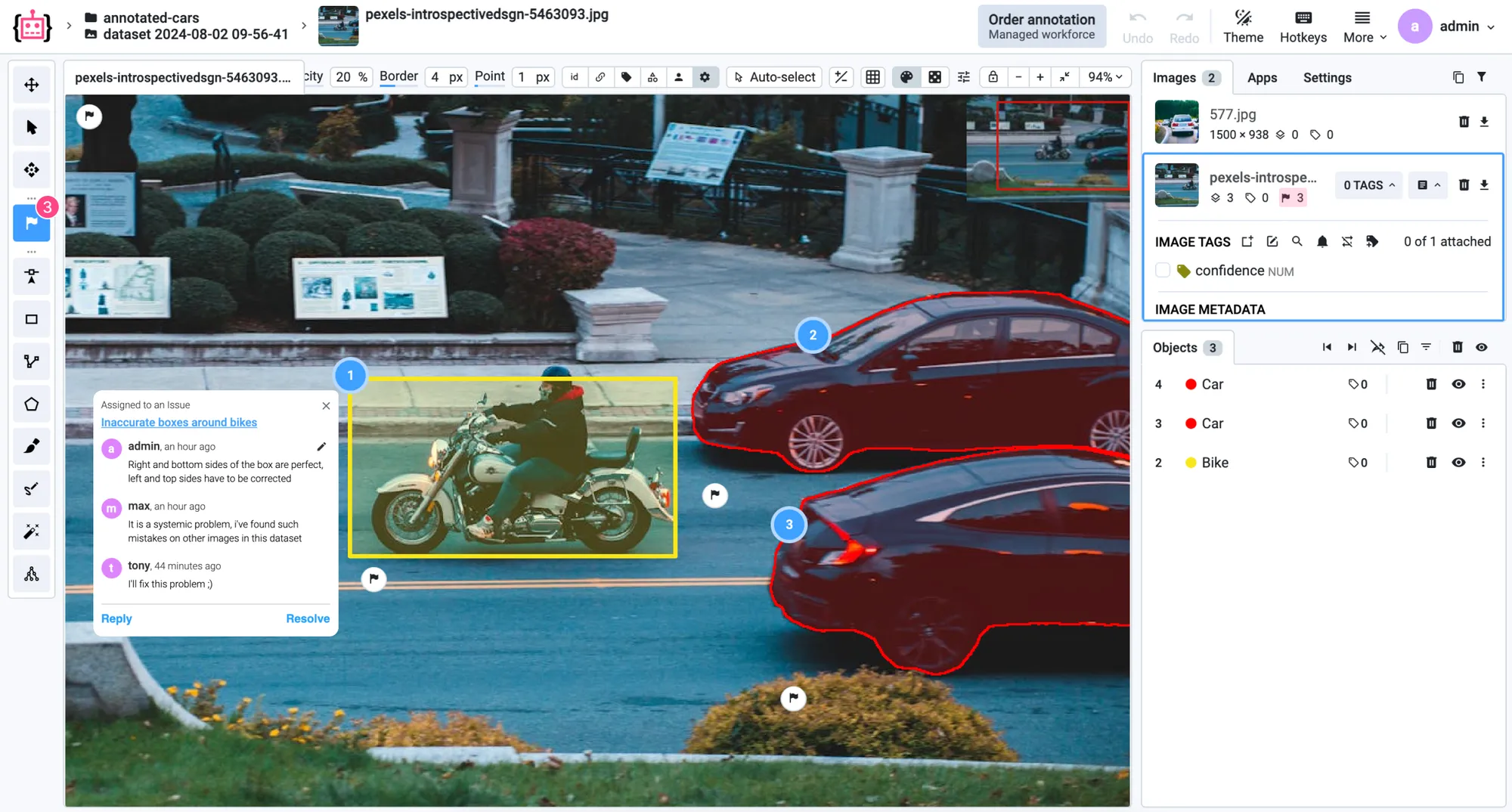
Issues are a tracker built into Supervisely, modeled on GitHub Issues and adapted to labeling. Flag an object, an image or a region right in the labeling tool, talk it through in a thread with the annotator and resolve it once the fix is in.
Here’s why teams trust us.
“A very high product quality.”
BMW Group uses Supervisely to annotate manufacturing images from production lines in their world-wide plants for enhancing quality inspections using deep learning. Supervisely is integrated into the BMW Group AI Platform in order to empower computer vision based AI use cases.
 BMW Group · Manufacturing quality inspection
“Immensely grateful for their pivotal role in our work”
Working with Supervisely has significantly enhanced our capability to develop AI models for lung CT scans. What sets Supervisely apart is its exceptional support team who are really responsive and adapt to our unique needs with a range of apps and helper files.

“Helps us to do data scientist work better and faster”
We use Supervisely since 2019. The key advantage of this tool is that Supervisely provides a complete data treatment pipeline. An important advantage is that a Supervisely instance can be deployed autonomously on a Client infrastructure, and distributed on different servers.

“A valuable part of our computer vision operations”
Supervisely is a valuable part of our computer vision operations, enabling our teams to efficiently work with camera and LiDAR data across sensor fusion projects. We use Supervisely for its extensive feature set and its ability to adapt to our changing requirements.

“Extremely satisfied with Supervisely and would highly recommend it”
The review tools have been invaluable in ensuring the quality and accuracy. The Python SDK has also been incredibly helpful in automating and streamlining our workflow. The support team on Slack has been extremely helpful and responsive.

“Supervisely excels at that and much more”
We’ve been exceedingly impressed with the customer support, addition of new features, and the flexibility of the publicly available SDK/API. The Supervisely team has also been fast to respond to support questions, and has shown a lot of openness when given feedback on potential improvements.

Your team next?
Talk to a computer vision engineer about your data, your models and your infrastructure.
Book a demoFrequently asked questions.
Labeling jobs, queues and issues are part of every plan, including the free Community edition.
How do I assign labeling tasks to annotators in Supervisely?
Create a labeling job: pick the data, the classes and tags to use, the annotators and a reviewer. Each annotator gets their own job on the Labeling Jobs page, labels in the browser and submits the work for review. The labeling jobs guide walks through every step.
What is the difference between labeling jobs and labeling queues?
A labeling job gives each annotator a fixed part of the data up front. A labeling queue keeps the data in a shared pool and hands the next item to whoever is free, so faster annotators label more and nobody waits. Queues suit large datasets and big teams; jobs suit fixed batches.
Who can create labeling jobs, and what do annotators see?
Admins, developers, managers and reviewers can create labeling jobs. Annotators see only the Labeling Jobs page and the jobs assigned to them, so the rest of the team's projects stay out of reach. Roles are set per team, and the same person can have different roles in different teams; see roles and permissions.
Can external annotators work on our data without access to the rest of our projects?
Yes. Invite them to your team as annotators: they see only the Labeling Jobs page and the jobs assigned to them, and the data never has to be exported and uploaded back. On Pro, labeling members cost €35 per user and labeling hours €0.65 per hour; see pricing.
How many people can work in one team?
Community includes 2 members. Pro includes 3 members, and each extra member costs €85 per month. Enterprise has no limit on members. Workspaces are unlimited on every plan, and one user can belong to up to 2 free teams and any number of paid ones. Compare the plans.
How do I track the progress of an annotation team?
Each job on the Labeling Jobs page shows its status and how many items are done, and managers and reviewers can open its Stats. The Team Members page has statistics for every person, and the activity log, part of Pro and Enterprise, records editing time, completed jobs and labeled images, with export to CSV and access through the API. For speed and quality across the whole team, see Labeling Performance.