

Labeling, data and models
in one computer vision platform.
Supervisely is an end-to-end computer vision platform. Teams label images, videos, 3D point clouds, DICOM volumes, meshes and audio, manage datasets and annotation teams, and train, evaluate and deploy models, in the cloud or on their own servers.


Labeling interfaces for six types of data.
Images, videos, 3D point clouds, DICOM volumes and meshes each have a labeling toolbox in the browser, and Supervisely labels time segments in audio files. In every one of them, smart tools and your own models take the first pass.
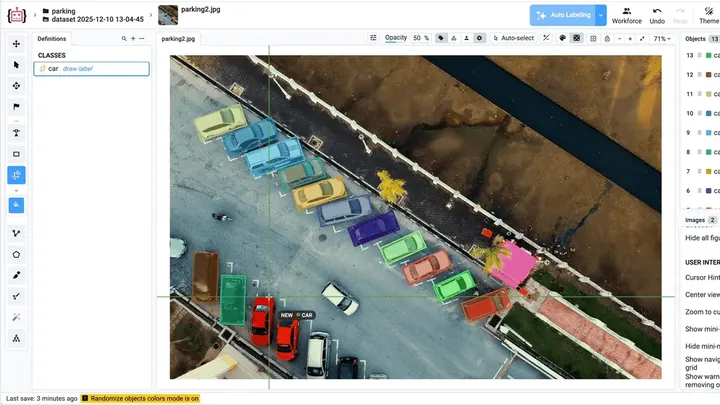
Image labeling
Boxes, polygons, brushes, keypoints and the Smart Tool for pixel-accurate masks, on anything from photos to multispectral, multi-view and very large images.
-
Video labeling
Label hours-long videos without cutting them into frames, on a multi-track timeline with built-in object tracking and tags for time ranges.
-
3D point clouds
Label LiDAR and RADAR point clouds and episodes with cuboids and segmentation, next to synchronized camera images, with AI object tracking.
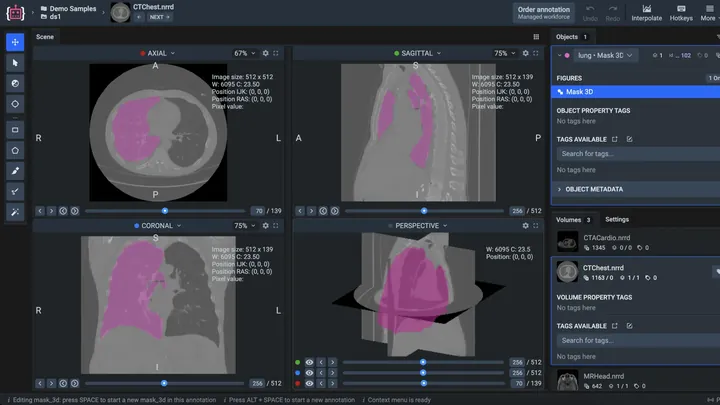
Medical imaging
Label CT and MRI volumes from DICOM, NRRD or NIfTI files in axial, sagittal, coronal and 3D views. Label key slices, and 3D interpolation reconstructs the object across the rest.
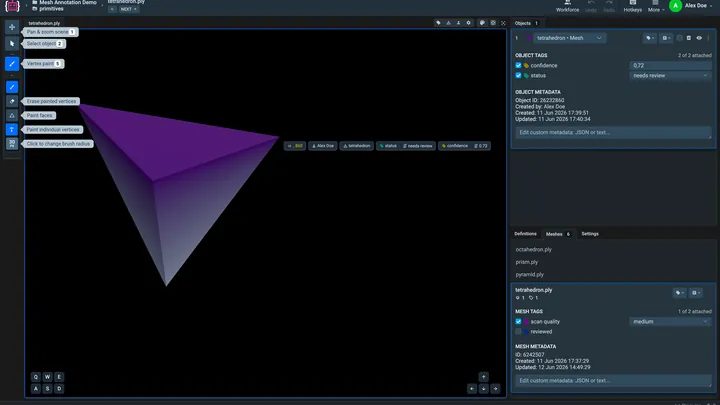
Meshes
The mesh labeling toolbox paints vertices and faces on PLY, STL and OBJ meshes to label surface regions, with tags and metadata for every mesh and object.

AI-assisted labeling
The Smart Tool turns a box and a few clicks into a precise mask with Segment Anything 3 and other interactive models, and deployed models pre-label whole projects.
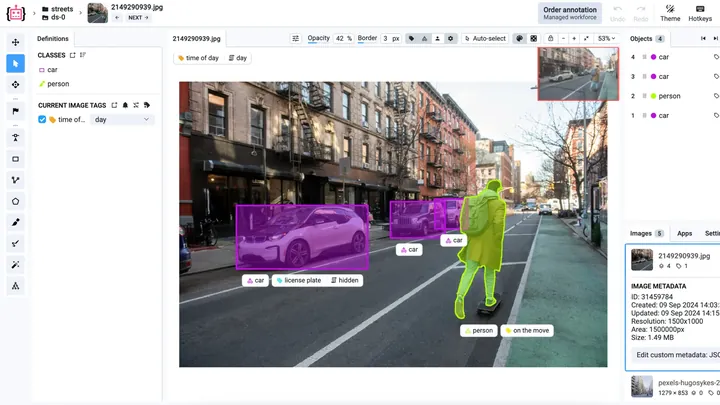
Custom labeling UI
When no standard toolbox fits a task, build a labeling interface of your own in Python with App Engine and its ready-made widgets, and run it inside Supervisely.
Manage the data and the teams that label it.
Import and organize datasets, split the work between annotators, review every label and decide who can see what.
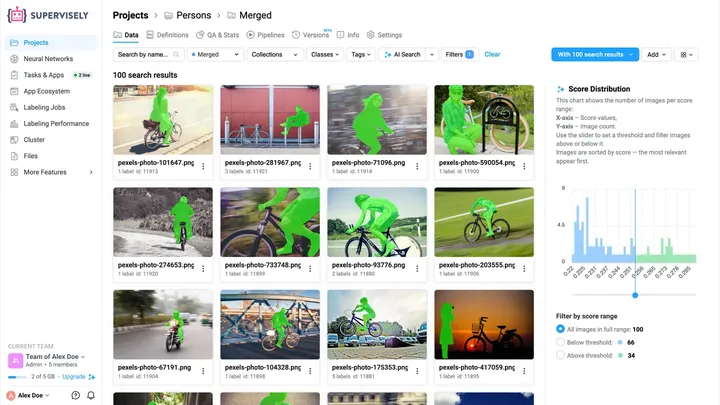
Data management
Import COCO, YOLO and other formats, organize projects and datasets that nest like folders, find images with filters and AI Search, and save project versions.
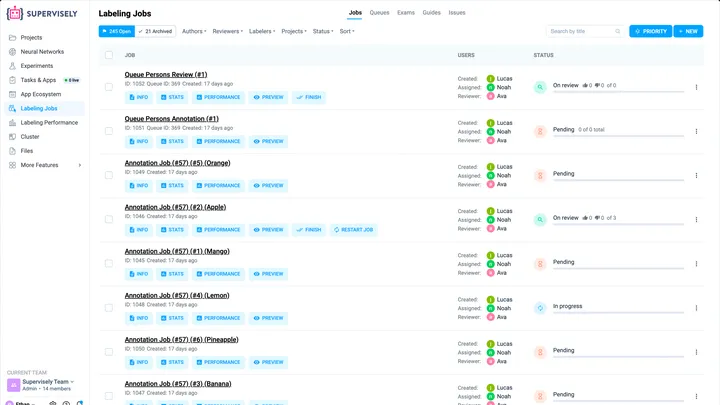
User collaboration
Bring annotators, reviewers and managers into teams with six roles, assign work through labeling jobs and queues, and discuss any label in an issue.
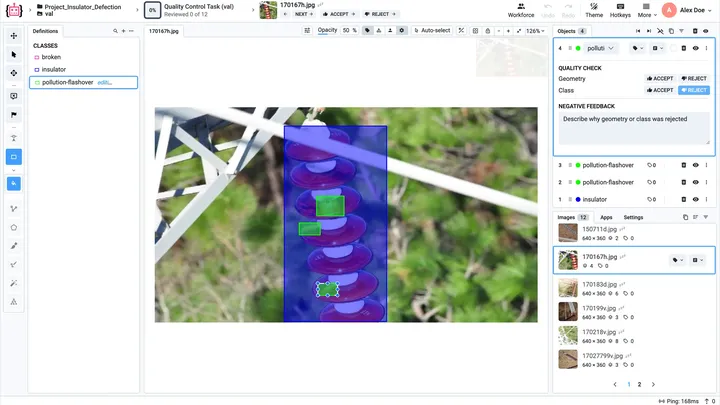
Quality assurance
Reviewers accept or reject every labeled item, consensus measures how far annotators agree, and exams, issues and statistics catch errors before they reach a model.
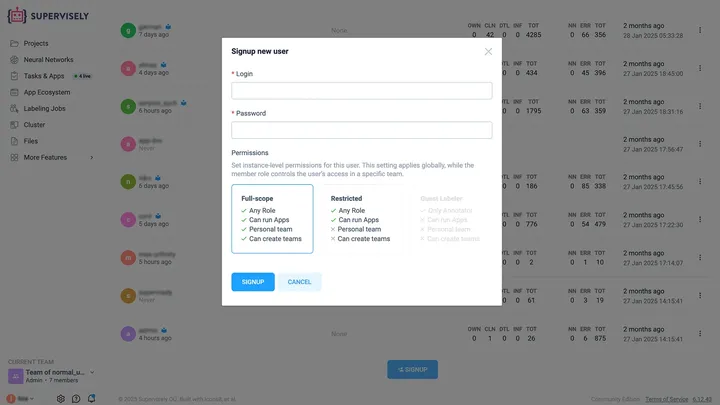
Security and permissions
Role-based permissions in every team and an activity log of every action. Enterprise adds single sign-on through OpenID Connect or LDAP and admin control of every account.
Train, evaluate and improve models on your data.
Training, deployment, data preparation and evaluation run next to the labeled data, so there is no export step between labeling and a model.
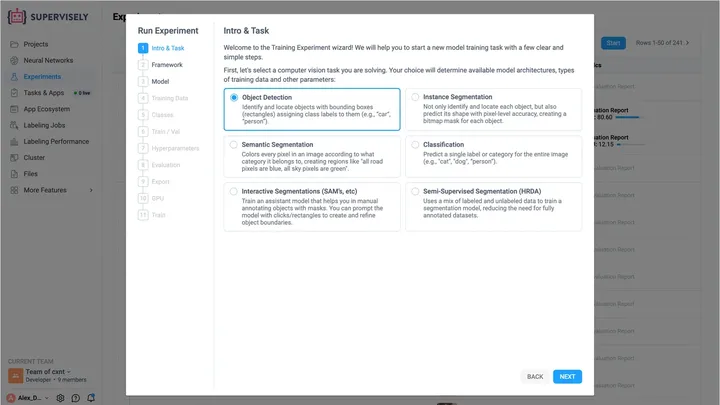
Train, serve and apply
Train YOLO26, DEIMv2, RT-DETRv2 or SAM 3 on your labeled data without code, deploy models on your own GPUs, and pre-label new data or serve predictions through an API.
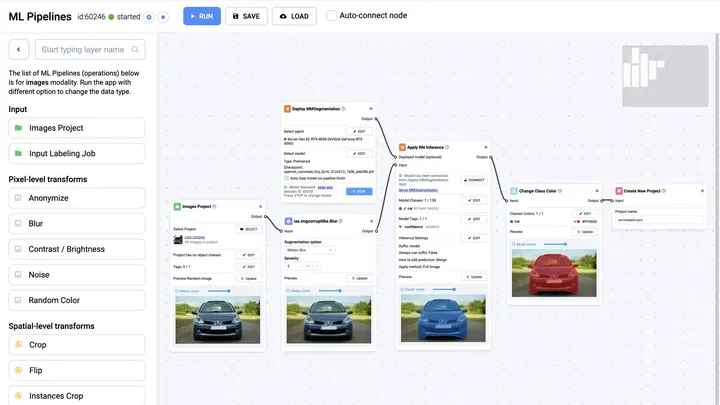
Query and transform
Find images by class, tag or text prompt, convert annotation formats and shapes, split train and validation sets, and augment data in ML Pipelines.
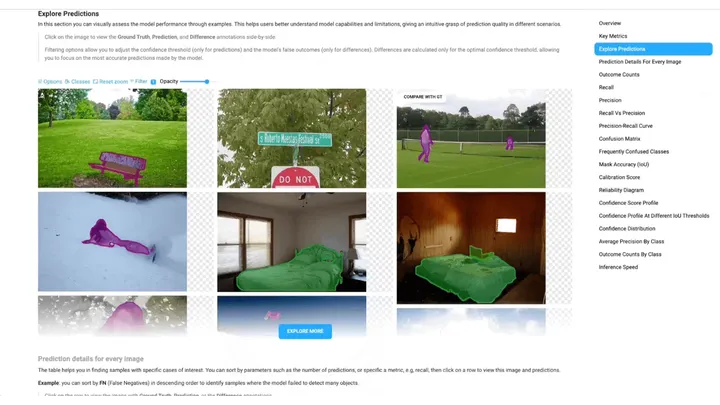
Evaluate and improve
Every trained model gets an evaluation report with mAP, precision and recall, and a click on any error opens the images behind it.

Synthetic data
Turn a few labeled objects into new training images: apps paste augmented copies of your objects onto backgrounds, so every generated image comes labeled.
How the parts fit together.
A typical project moves through the platform in six steps, and the last one feeds the next round of labeling.
- 01
Import
Drop files, folders or archives into Import Data. Supervisely detects COCO, YOLO and other formats and builds the project.
In the app Projects · Import Data Data management - 02
Label
Split the data into labeling jobs or a labeling queue. Annotators label it in the toolbox for its type, with the Smart Tool for the first pass.
In the app Labeling Jobs User collaboration - 03
Review
Reviewers accept or reject every item, rejected items go back for relabeling, and Labeling Performance shows speed and acceptance rates.
In the app Labeling Performance Quality assurance - 04
Train
Pick a training app from the project’s Neural Networks menu, choose the classes and the split, and train on a GPU machine you connect.
In the app Neural Networks Train, serve and apply - 05
Evaluate
By default, the Model Evaluation Benchmark runs when training ends. Its report opens from the Experiments table, and every error leads to its images.
In the app Experiments Evaluate and improve - 06
Pre-label the next batch
Apply the new model to fresh data with the Predict App, and the next round of labeling starts from its predictions instead of empty images.
In the app Experiments · Apply Model AI-assisted labeling Then back to step 2
Runs in the cloud or on your servers, and extends with apps.
Start in the cloud for free, move to your own servers with Enterprise, and add apps or code when you need more.
-
Enterprise Edition
Self-hosted on your servers, in a private cloud or fully offline, with single sign-on, custom roles and priority support.
Supervisely Enterprise -
Ecosystem
400+ apps for import and export, neural networks and data tools, each one click away, and App Engine for apps of your own.
Explore the Ecosystem -
Pricing
Community is free with 2 members, 5 GB of storage and 10,000 files. Pro starts at €199 per month, and Enterprise is custom-priced.
Compare plans -
Developer portal
Guides to the open-source Python SDK and the REST API: automate Supervisely, connect it to your software and build your own apps.
Supervisely developer portal
Here’s why teams trust us.
“A very high product quality.”
BMW Group uses Supervisely to annotate manufacturing images from production lines in their world-wide plants for enhancing quality inspections using deep learning. Supervisely is integrated into the BMW Group AI Platform in order to empower computer vision based AI use cases.
 BMW Group · Manufacturing quality inspection
“Immensely grateful for their pivotal role in our work”
Working with Supervisely has significantly enhanced our capability to develop AI models for lung CT scans. What sets Supervisely apart is its exceptional support team who are really responsive and adapt to our unique needs with a range of apps and helper files.

“Helps us to do data scientist work better and faster”
We use Supervisely since 2019. The key advantage of this tool is that Supervisely provides a complete data treatment pipeline. An important advantage is that a Supervisely instance can be deployed autonomously on a Client infrastructure, and distributed on different servers.

“A valuable part of our computer vision operations”
Supervisely is a valuable part of our computer vision operations, enabling our teams to efficiently work with camera and LiDAR data across sensor fusion projects. We use Supervisely for its extensive feature set and its ability to adapt to our changing requirements.

“Extremely satisfied with Supervisely and would highly recommend it”
The review tools have been invaluable in ensuring the quality and accuracy. The Python SDK has also been incredibly helpful in automating and streamlining our workflow. The support team on Slack has been extremely helpful and responsive.

“Supervisely excels at that and much more”
We’ve been exceedingly impressed with the customer support, addition of new features, and the flexibility of the publicly available SDK/API. The Supervisely team has also been fast to respond to support questions, and has shown a lot of openness when given feedback on potential improvements.

Your team next?
Talk to a computer vision engineer about your data, your models and your infrastructure.
Book a demoFrequently asked questions.
What is Supervisely?
Supervisely is an end-to-end computer vision platform. Teams use it to label images, videos, 3D point clouds, DICOM volumes, meshes and audio, to manage datasets and annotation teams, and to train, evaluate and deploy models. It runs in the browser, in Supervisely’s cloud or on your own servers, and extends with 400+ apps and an open-source Python SDK.
Which data types can I label in Supervisely?
Images, including multispectral and multi-view ones, videos, LiDAR and RADAR point clouds and episodes, and DICOM, NRRD or NIfTI volumes each have a labeling toolbox: see image labeling, video labeling, 3D point clouds and medical imaging. The mesh labeling toolbox paints vertices on PLY, STL and OBJ meshes, and Supervisely labels time segments in audio files.
Can I run Supervisely on my own servers?
Yes, with the Enterprise Edition. It runs on your own servers, in a private cloud or in a Kubernetes cluster, or fully offline in a network without internet access. Enterprise comes with a free trial of 30 days or more.
Is there a free plan?
Yes. Community is free for individuals, researchers and small teams and needs no credit card: 2 members, 5 GB of storage and 10,000 files. Pro starts at €199 per month with 3 members included, and Enterprise is priced by the modules and users you need. Compare the plans.
Which models can I train in Supervisely?
Training apps cover YOLO from YOLOv8 to YOLO26 for detection, segmentation and pose estimation, DEIMv2 and RT-DETRv2 for real-time detection, MMDetection 3.0, and fine-tuning of Segment Anything 3 and 2.1. They run in the browser on GPU machines you connect, and Enterprise adds architectures of your own through the Python SDK. See model training and deployment.
Do I need to write code?
No. Labeling, data management, training, deployment and evaluation all work in the browser. Code is optional: the open-source Python SDK and the REST API automate the platform, and App Engine turns Python scripts into apps with a web interface. Start at the developer portal.